


You might be wondering what is MagSafe and how it works in 2025. MagSafe is Apple’s magnetic wireless charging and accessory system that allows you to charge your devices and attach accessories with a simple snap. Originally, MagSafe was introduced as a safety connector for MacBooks. Today, it powers iPhones, AirPods, and a variety of other accessories. This technology uses strong magnets to perfectly align your devices, making charging faster and more reliable while also making it easy to attach accessories. As more people around the world, especially in North America and Asia Pacific, adopt MagSafe, the range of available chargers, magnetic wireless charger power bank, wallets, and mounts continues to grow. These options make using your tech every day more convenient.
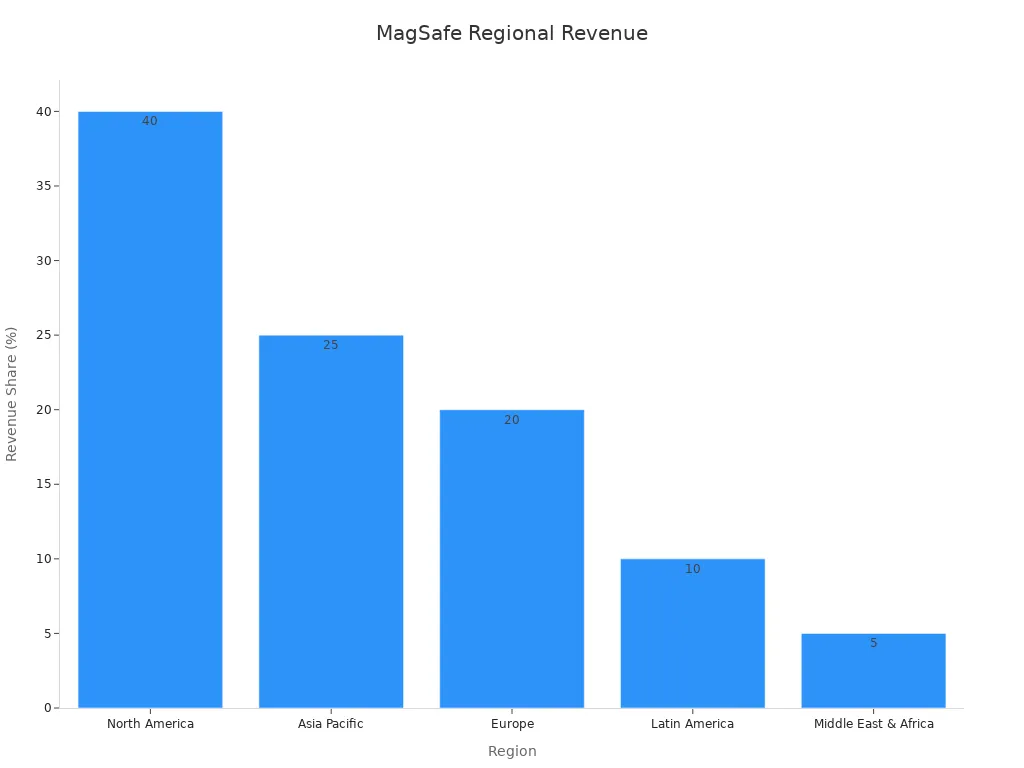
Understanding what is MagSafe, its compatibility, benefits, and how to use it will help you get the most out of your Apple devices in 2025.
Key Takeaways
- MagSafe uses strong magnets to hold your Apple devices in place. It gives fast and steady wireless charging. It also lets you attach accessories easily.
- It works with iPhone 12 and newer phones. Some AirPods and many accessories work too. Wallets, cases, and mounts snap on without tools.
- MagSafe chargers give up to 15W of power. They charge faster than old wireless chargers. But they are slower than wired chargers. They also help keep your battery from getting too hot.
- Picking ‘Made for MagSafe’ accessories is smart. These have strong magnets and fit well. They also give safe and fast charging for your Apple devices.
- MagSafe is easy to use and looks nice. It makes charging and using accessories simple. But it can cost more. You also need the right cases for the best results.
What Is MagSafe
MagSafe Technology
When you ask about MagSafe, you learn it is Apple’s special magnetic system. This system lets you charge your devices without wires and attach accessories easily. Inside your iPhone or AirPods case, there is a ring of strong magnets. These magnets help your device line up perfectly with MagSafe chargers and accessories. This makes sure your phone stays on the charger and your case fits well.
MagSafe chargers today can give up to 15W wireless charging. They use Qi2 wireless charging, which makes charging quicker and better. Some MagSafe chargers can give up to 65W of power with a cable for things like laptops. You also get features like RAPID magnetic charging, double cooling, and a smart screen that shows charging status. Many MagSafe chargers use EcoFlow’s high-density batteries, so you get more power in a smaller size. Some have a kickstand built in, so you can stand your device up while it charges. You can even use an app to change settings, like overheat protection.
MagSafe works with many devices, like smartphones, tablets, wearables, and laptops. You can pick standard, fast, or ultra-fast charging. The system supports both magnetic and wireless charging, and you can use a cable for more power.
Evolution
If you look back at MagSafe, you see it started as a safety idea for MacBook laptops. Apple first showed MagSafe in 2006. The first design used magnets to connect the power cable to the laptop. If someone tripped on the cable, it would come off safely, so your laptop would not fall. In 2012, Apple made MagSafe 2, which was thinner and fit newer laptops. But it did not work with the old version unless you had an adapter.
Apple stopped using MagSafe for a while when they switched to USB-C charging. The last MacBook Air with MagSafe came out in 2019. In 2021, Apple brought MagSafe back with the MagSafe 3 connector on new MacBook Pro models. This new version kept the magnetic connection but gave more power and better safety.
The biggest change happened when Apple added MagSafe to iPhones and AirPods. Starting with the iPhone 12 in 2020, you could use MagSafe for wireless charging and to attach things like wallets, cases, and stands. This created a new group of products that work together. Now, in 2025, you can use MagSafe with many Apple devices and enjoy lots of accessories that make your tech life easier.
How MagSafe Works
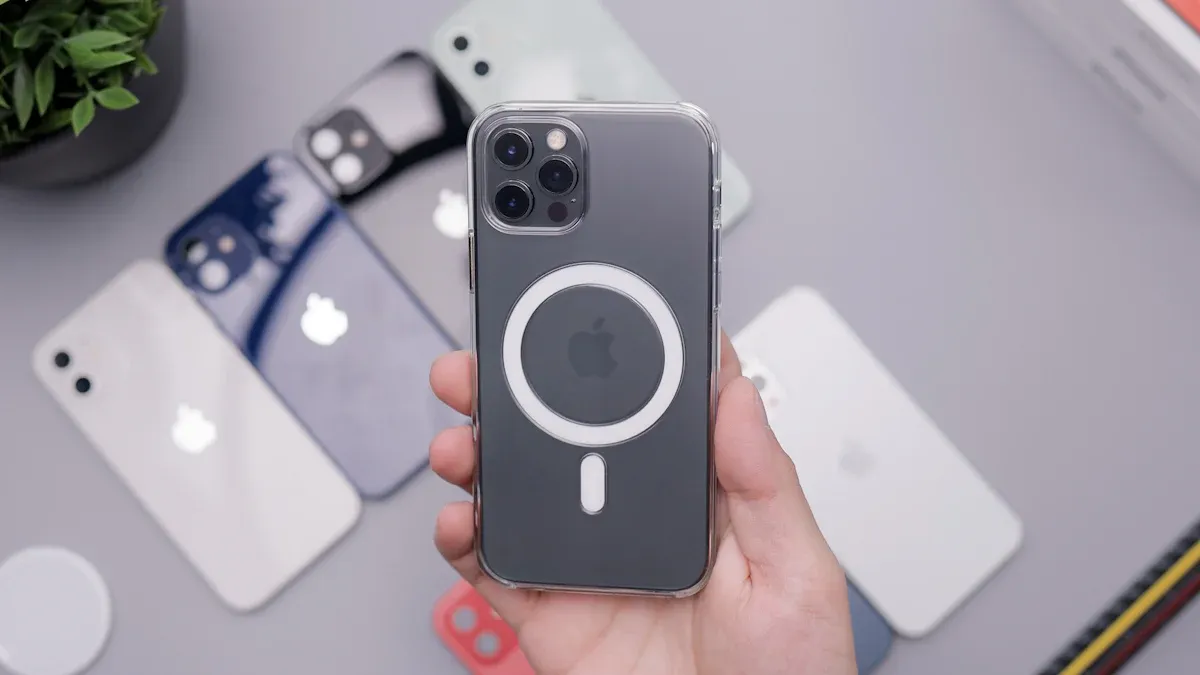
Magnetic Alignment
When you put your iPhone or AirPods on a MagSafe charger, you feel a soft snap. This happens because both the device and charger have a ring of strong magnets. The magnets pull your device into the right spot for charging. You do not need to line it up yourself. The magnets do that for you.
The magnetic ring also helps with accessories. If you attach a wallet, stand, or case, the magnets keep it in place. You can switch accessories easily without tools or clips. The magnets are so exact that you can charge or use accessories even if you are not looking.
Tip: If your device does not snap on, check if your case is MagSafe compatible. Some thick or metal cases can block the magnets.
Wireless Charging
MagSafe uses a special coil inside your device and charger to send power without wires. The coil and magnets work together to move energy from the charger to your device with little waste. MagSafe uses the Qi2 wireless charging standard, so it works with many new chargers.
You get up to 15W of power when using MagSafe with iPhones. Tests show MagSafe chargers start charging faster than old wireless chargers. The magnets help the coils line up, so your phone gets more power right away. Charging from empty to full is quicker, but the charger slows down as your battery fills up. This helps keep your battery safe.
Here is a table with some MagSafe charging details:
| Parameter | Details |
|---|---|
| Charging Efficiency | >85% |
| Output Power | Up to 15W |
| Charging Distance | 3-8 mm |
| Coil Diameter | 42.5 ± 1 mm |
| Wireless Protocol | Qi (Qi2.0, MPP2.0 compliant) |
| Material | Hot air twisted wire (corrosion resistant) |
| Certification | Qi-certified by WPC, FCC compliance |
MagSafe chargers can get warm while charging. Apple added a safety feature that stops charging if your iPhone gets too hot, usually around 80% battery. This keeps your battery from getting damaged. Many people notice their phones feel warm, but this is normal. The system will pause charging to keep your device safe.
- Key points about MagSafe charging:
- Fast charging at first, then slows down to protect your battery.
- Uses more energy than wired charging, but is better than old wireless chargers.
- Built-in safety stops charging if your phone gets too hot.
Accessory Attachment
MagSafe is not just for charging. You can attach many accessories, like wallets, stands, and battery packs. The magnets hold these items tightly in place. Your iPhone uses a magnetometer and NFC to know what you attach. When you snap on a MagSafe wallet, your phone can show a message or animation. Some accessories even unlock special features on your device.
You can use MagSafe with many types of accessories:
- Charging stands and docks
- Wallets and card holders
- Battery packs
- Car mounts
- Cases and grips
Note: Always look for the MagSafe logo or Qi2 certification to make sure your accessory works well with your device.
MagSafe makes it easy to change accessories. You do not need to plug or unplug anything. The system knows what you attach and changes settings for the best use.
If you want to know what is MagSafe, think of it as a smart system. It uses magnets and wireless tech to make charging and using accessories simple and safe.
Compatibility
Supported Devices

You can use MagSafe with lots of Apple devices. If you have an iPhone 12 or newer, it works with MagSafe. This includes iPhone 13, 14, 15, and the new iPhone 16. The iPhone SE (3rd generation) and iPhone 16e do not work with MagSafe. Some AirPods work with MagSafe if you have the right case. AirPods (3rd generation) and AirPods Pro (1st gen after October 2021 and 2nd gen) come with MagSafe charging cases. AirPods (4th generation) have a wireless case, but it does not have magnets for easy alignment.
Here is a table that shows which devices work with MagSafe:
| Device/Accessory Type | Compatibility Details | Power Output / Standard | Notes |
|---|---|---|---|
| iPhone Models | iPhone 12 and newer (except SE 3rd gen, 16e) | Up to 15 W (1st gen), 25 W (2nd gen) | iPhone 16/16 Pro support faster 25 W charging |
| AirPods Charging Cases | AirPods (3rd gen), AirPods Pro (1st gen after Oct 2021, 2nd gen) | Qi and MagSafe compatible | AirPods (4th gen) case lacks magnets for alignment |
Tip: Always check your device before you buy MagSafe accessories.
Accessory Types
There are many kinds of MagSafe accessories you can use. Apple and other companies make cases, chargers, battery packs, stands, and car mounts. MagSafe cases snap onto your phone and let you use other MagSafe products at the same time. MagSafe chargers give you fast wireless charging. Battery packs stick to the back of your phone and charge it while you move. Stands and mounts hold your phone for video calls or when you drive.
- Popular MagSafe accessories:
- Cases and clear covers
- Wireless chargers and charging pads
- Battery packs
- Car mounts and dashboard holders
- Wallets and card holders
Third-Party Options
You can find lots of third-party MagSafe accessories. Brands like Belkin, Mophie, Nomad, and OtterBox make “Made for MagSafe” products. These follow Apple’s rules and give you up to 15 W charging with the first MagSafe. Some other brands sell “MagSafe compatible” chargers, but these often use older Qi tech and only give you up to 7.5 W charging. Always look for the “Made for MagSafe” label for the best results.
Note: Not all third-party accessories are as fast or safe as Apple’s. Check the box or product info before you buy.
Benefits and Drawbacks
Advantages
MagSafe gives you many good things for your devices. It charges faster than old Qi chargers. The magnets help you put your phone in the right spot. You do not have to guess where to place it. Just snap your device on, and it starts charging. This makes charging easy and works every time.
You can use lots of accessories with MagSafe. Wallets, stands, and battery packs snap on quickly. The design keeps your phone looking neat and new. Many people like how MagSafe accessories fit and stay on tight. If you have more than one Apple device, MagSafe helps you keep them charged and organized.
MagSafe chargers can give up to 15W or even 25W on new models. This is much faster than the 7.5W you get from regular Qi chargers.
Limitations
MagSafe is not perfect. Not all cases work with MagSafe. Thick or metal cases can block the magnets. You might need to buy a special case for it to work. MagSafe chargers and accessories usually cost more than other types. This can be a problem if you want to save money.
Some people say MagSafe chargers get warm when charging. The charger slows down as your battery fills up to stop it from getting too hot. If you have a heart device like a pacemaker, keep MagSafe at least 15 cm away. Studies show MagSafe magnets can affect these medical devices.
Always check if your device and case work with MagSafe before you buy accessories.
MagSafe vs Wired
You may wonder how MagSafe and wired charging are different. Wired chargers, like USB-C, charge your phone faster and use less energy. MagSafe is faster than old wireless chargers but still slower than a good wired charger.
Here is a table that shows how fast each charger works:
| Charger Type | Charge at 10 min | Charge at 30 min | Total Time to 100% | Peak Power Delivered |
|---|---|---|---|---|
| 5W USB-A | 6% | 17% | 3 hr 15 min | N/A |
| Qi Wireless | 3% | 20% | 2 hr 40 min | ~7.5W |
| MagSafe Wireless | 8% | 31% | 2 hr 10 min | Up to 15W |
| 20W USB-C Wired | 17% | 52% | 1 hr 55 min | 20W |
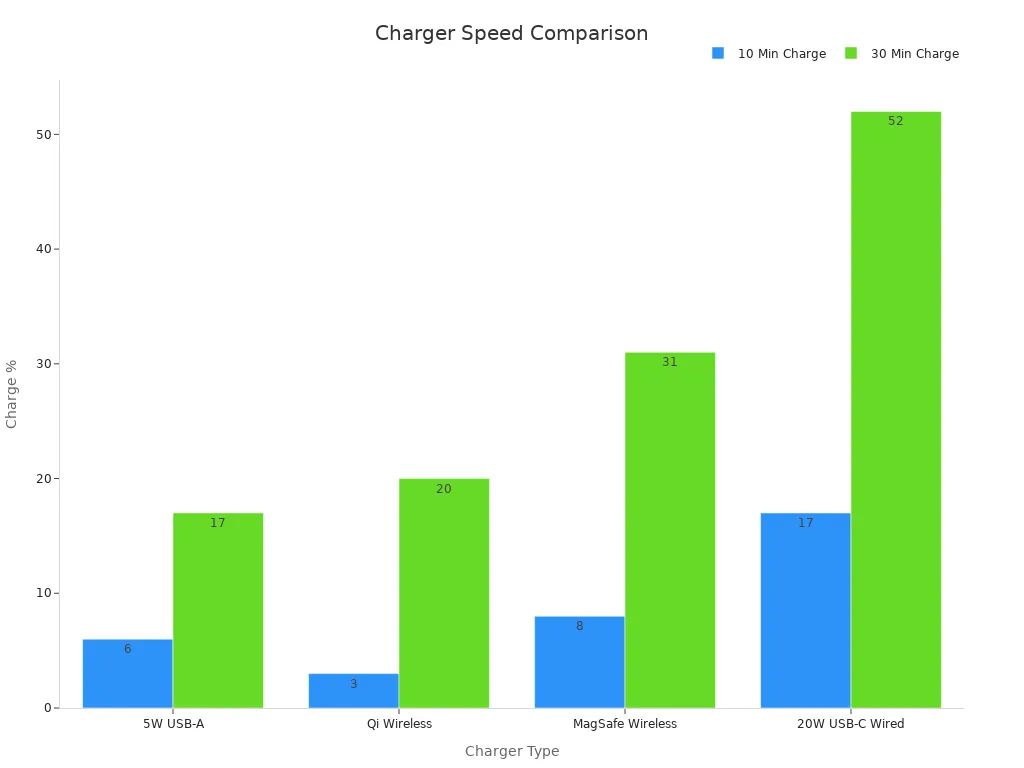
Wired charging is still the fastest and cheapest way to charge. MagSafe is easier to use and lets you try more accessories, but it costs more. If you have many Apple devices and like wireless charging, MagSafe can help you a lot. If you care most about speed and saving money, wired charging is the best choice.
Using MagSafe
Choosing Accessories
When you pick MagSafe accessories, look for the “Made for MagSafe” label. This label shows the product is safe and works well with Apple devices. Check if your case is thin enough. Cases about 0.8mm thick keep the magnets strong. Thicker cases can make the magnets weaker and slow down charging. If you want a wallet, stand, or battery pack, make sure it snaps on tight and does not fall off. Good MagSafe accessories use strong neodymium magnets and good materials. These last longer and work better with your device.
Here is a quick comparison:
| Feature | MagSafe Accessories | Generic Alternatives |
|---|---|---|
| Magnetic Strength | High, precise alignment | Varies, less accurate |
| Material Quality | Premium, durable | Cheaper, less durable |
| Price Range | $39–$99 | $10–$30 |
| Device Integration | Seamless | Limited |
Tip: Some third-party MagSafe-compatible products cost less and still work well if they are Apple-certified.


Tips for Use
To get the best results, line up your device with the charger until you feel a snap. This helps your phone charge fast and keeps your battery healthy. Use a MagSafe charger with temperature control and auto-shutoff. These features stop your phone from getting too hot and help your battery last longer. Keep your accessories clean and free from dust. This helps the magnets stay strong.
Tests show that magnet placement and strength matter a lot. Magnets that are too strong or too close to the coil can make your phone hot and waste energy. Some accessories use Halbach arrays to focus the magnetic force. This makes them safer and helps them stick better. If you use a case, pick one that is thin and made for MagSafe. This keeps charging fast and reliable.
Note: MagSafe works with over 50 types of accessories. You can find options for home, office, or travel.
Is It Worth It?
MagSafe gives you real benefits. You get faster charging—up to 15W—compared to old wireless chargers. The magnets make charging easy and quick, often in less than a second. MagSafe accessories also protect your device from port damage. This can happen if you plug in and unplug wires a lot. Official MagSafe products cost more, but they last longer and work better with Apple devices. Third-party options can be cheaper and still work well if they meet Apple’s rules.
If you want convenience, safety, and lots of accessories, MagSafe is a smart choice in 2025. If you want to save money and do not need extra features, certified third-party products are a good choice.
Now you know what MagSafe is and why it matters in 2025. MagSafe lets you charge your device quickly. It also makes using accessories simple. Many people like MagSafe because it is fast and easy to use.
- More than half of young people pay extra for MagSafe.
- The market gets bigger every year, and wallets cost $28 to $42.
| Feature | MagSafe Advantage |
|---|---|
| Charging Speed | Up to 15W, fast and safe |
| Accessories | Wide range, easy to use |
| User Loyalty | High satisfaction |
If you want charging and accessories that are simple and work well, MagSafe is a good choice. Think about what you need and how you use your device before you decide to upgrade. The hot sell 5000mAh wireless charging power bank may be you should try.